
The standard career timeline is for amateurs — get promoted quickly with these strategies:
It was my first day at my new job. I had graduated college just a month prior and this was my dream job… well, not so much. This was the only job on the list that a) gave me an offer and b) paid the most, so, naturally, I took it!
After introductions to other team members, managers, and key leaders, I was immediately thrown into the job. The day consisted of meetings, getting assigned some small introductory tasks, and learning the business through various resources.
I was completely overwhelmed!
- Did I need to be involved in so many meetings?
- When would I have time to do my work?
- What was most important?
What I needed to know at the time is what I’m going to lay out below:
- I needed a productivity system
- I needed to learn to take notes
- I needed to master a skill
If you’re just starting in your career, or tired of being stuck, let me save you some time and condense what I’ve learned in 10 years into something that will make you a productivity powerhouse and get you that promotion fast.
Strategy #1: I needed a productivity system
As you can imagine, productivity was a completely foreign term to me. When I started at my job, it was like drinking out of a fire house; I was doing whatever tasks I was assigned in the most recent order they were assigned, going to whatever meetings I was invited to, and, frankly, struggling to stay above water.
The escape to this mess was a productivity system. Many people get caught up in which particular system is the best, but my advice to you is to choose one and stick with it. The system that I used was called Getting Things Done by David Allen. I recommend reading the book yourself, as it’s extremely detailed, but these are the main reasons to use a system:
Capture:
- Throughout a normal work day, you get 10,000 things thrown at you; there’s no way that you can remember all of them. You might remember the most important, but even that’s a stretch. Near the end of the day, your brain will start panicking because you can’t remember what was assigned and you end up either doing random tasks or you finally remember the important task at 2am and can’t fall back asleep. Having a way to capture tasks and thoughts throughout the day allows you to organize them later and, more importantly, allow your brain to rest and rely on your capture system.
Clarify
- Now that you’ve accumulated a list of tasks and random thoughts/ideas throughout the day, it’s time to make sense of them. The Clarify bucket is used to clarify your randomly jotted down notes. Like in the example I have below, “Develop an automated way to help Gary with costing” becomes specific — “The automated way to help Gary with costing would be to connect file A.1 with B.2”. Use the Clarify section to turn your thoughts into clear actions.
Organize
- The Organize section is all about taking your clarified actions, from the previous step , and either assigning them to your calendar (ex: 8–9am — do task A; 10–11am — do task B) or putting them on your All Next Actions list in a priority order so that when you have free time, there is no confusion at all about what you should be doing. You immediately go to your All Next Actionslist and start on the first.
Example of GTD (My Version)
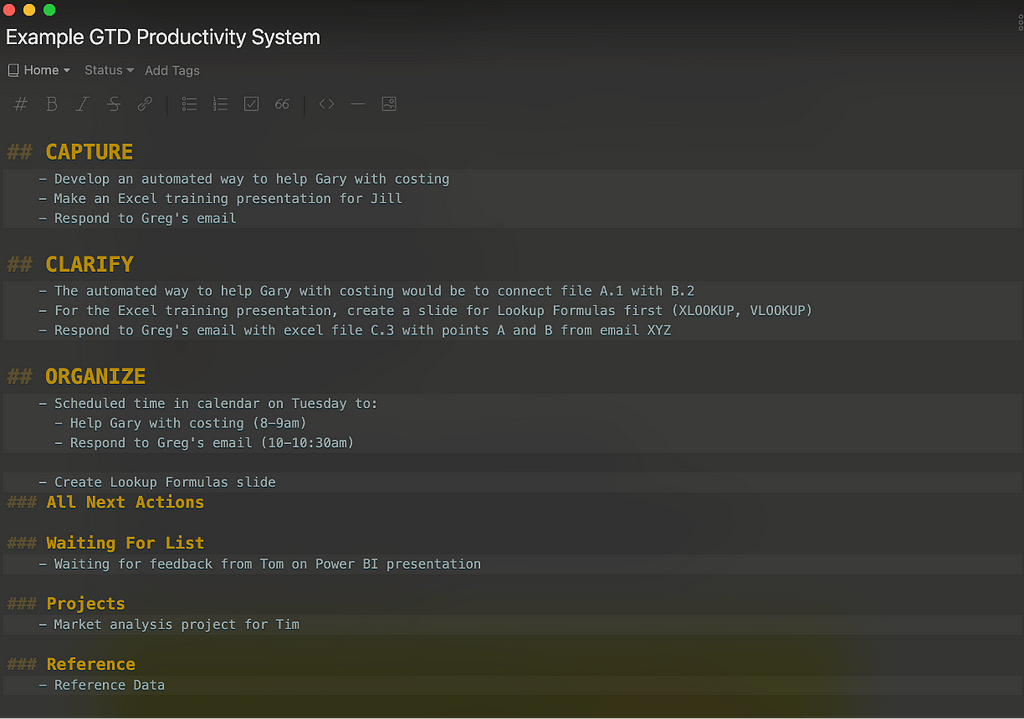
Instituting a productivity system into your job will, alone, 50x your results and get you noticed. Productivity systems aren’t just a way to maximize every minute of your day, they allow your brain to relax and let you get control of your time.
Strategy #2: I needed to learn to take notes
My first few weeks at my first job were crazy — I was thrown into about 100 meetings, I had tons of things I had to do, and I was constantly being taught/expected to know new things. Each day, I felt like I was learning a ton, but when it came time to use the information, it was lost.
I needed to learn to take notes, period. I didn’t need to learn how to take notes, I didn’t need some fancy note-taking system, I just needed to write down either exactly what was being said or memory triggers for what was being said/taught.
When you’re thrown into 7 or 8 meetings/day, no matter how good your memory is, you’re going to forget the information or tasks that were assigned to you. The same goes for learning the business or skills or anything that’s needed for the job. Taking notes is key! Below is how I typically take notes for meetings, but research different methods and figure out which method works best for you:
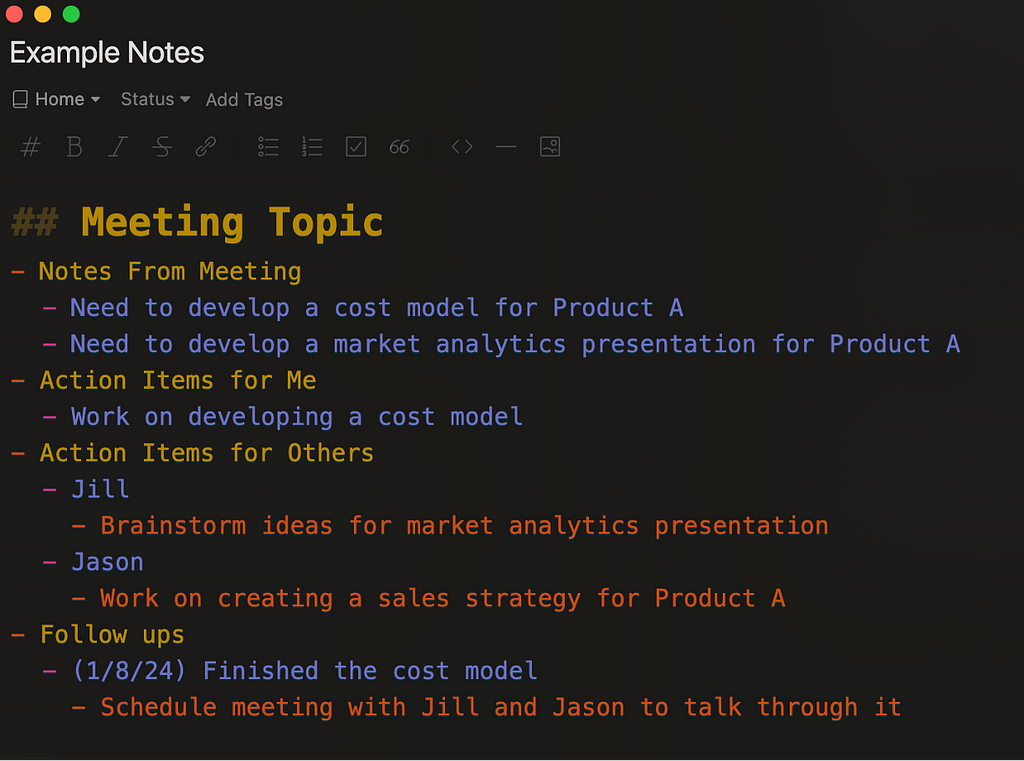
Note-Taking Tools
I’ve tried a lot of tools over the years and below are the best two that I recommend to everyone:
- Anything that you can think of doing with notes, databases, or anything of that nature, you can do with Notion. It can be your dashboard for learning, finances, home, work, and life in general. Its amazing!
- This is another favorite of mine since I love taking notes in both Markdown (which Notion also supports) and Vim. Taking notes in markdown with Vim shortcuts is probably the most amazing thing I could dream of and Inkdrop is it!
Strategy #3: I needed to master a skill
When I started my first job, I had no skills whatsoever. Could I whip up mean slides in PowerPoint? No. Did I have presentation skills? Nope. Surely I was good at Microsoft Excel going into a finance job? Never opened it!
From my experience, the immediate skills that you bring to an entry-level job don’t really matter, but what does is that you have the ability to learn the required skills quickly. My recommendation to you goes a step further, in addition to the basic skills you need to function in a job, you should double down on one specific skill and become world class at it. Become your company’s expert with that specific skill. Over continued practice and dedication to become great at that skill, you’ll have opportunities open up to you that you never saw coming. Additionally, you’ll learn the greatest skill of all, that I mentioned in the beginning that employers really want, the skill of learning.
The skill that I chose was Microsoft Excel. In the article Excel Mastery with Daily Practice, I walk through how the daily practice that I used to become one of the top Microsoft Excel power users at my company.
I can’t guarantee that these techniques will get you promoted, but I can guarantee that if you follow these techniques, you’ll be a better version of yourself and, in turn, raise the bar for others around you.
If you liked this, please visit my website. You can sign up for my monthly newsletter there as well. Thanks for reading!
Note: This blog contains an affiliate links, which means if you buy from my link, I’ll get an amount without any extra charge to you.